


Contacts
4.330.26K Reviews
App Specs
- Version
- Varies with Device
- Updated On
- License
- Free
- Downloads
- 5,000,000,000+
- Developer
- Google LLC
- Categories
- Communication
- Platform
- Android, iOS
Screenshots
 Analysis by AppCompare
I find a contacts app most useful when it quietly helps me reach the right person, rather than asking me to spend time maintaining a complicated address book. Contacts is Google LLC’s free communication app for keeping people’s details together and making them available across places where I use my Google account. It suits anyone who wants a familiar home for phone numbers and names, especially if changing phones or using more than one device is part of everyday life. Its scale is considerable, with over five billion installs, but what matters in practice is whether its straightforward approach fits the way you manage people.
Reading and finding people without extra effort
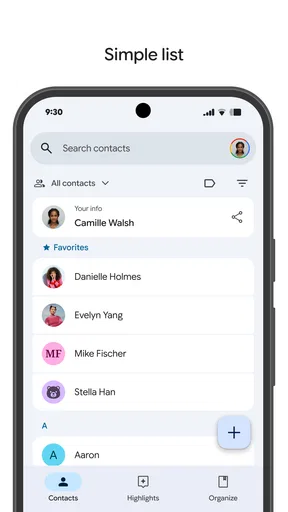
A contact list is only helpful if I can scan it and reach the person I need. The basic task here is simple: look up a name, open the record, and choose a way to get in touch. I appreciate that this is a practical, familiar pattern rather than a system that makes me learn a new workflow before I can call someone. If my list has grown over years, searching is usually a better starting point than scrolling from top to bottom.
There is a useful distinction between a tidy-looking list and a dependable one. Search can only help when a record contains enough of the right information, so I try to save a full name and label numbers or email addresses clearly when I add them. That small habit makes a difference when I have several people with similar names or a contact whose number I rarely use. I also find it sensible to check a record before starting a call, rather than assuming an old number is still current.
Guides and Analysis on Contacts
Keeping names and details understandable
Contact records work best when I treat them as small reference cards, not just a place to drop a number. A full name, a useful note about how I know someone, or a clear label for a work and personal number can prevent awkward mix-ups. I would not use an address book as a detailed customer database, but a little context is helpful for people I meet infrequently, such as a repair person or a parent from a school group.
For readability, the important question is whether I can distinguish one entry from another at a glance. Consistent naming helps more than an elaborate filing system: saving “Maya Chen — dentist” may be more useful to me than relying on memory later. I also avoid putting sensitive details into casual notes. A contact list is convenient, but convenience is not a reason to store information that I would not want visible to someone with access to my device or account.
Motor and sensory considerations in ordinary use
For someone who prefers fewer steps, a searchable address book can be less demanding than hunting through a long alphabetical list. The main benefit is not that every interaction is effortless for every person; it is that I can often go straight to a name instead of navigating through unrelated screens. When my hands are occupied or I am in a hurry, that shorter route matters. I still need to be able to operate the phone itself, and the app cannot remove the physical effort involved in tapping or typing.
People who rely on larger text, screen readers, voice input, or other device-level adjustments should judge the experience on their own phone and settings. I would not assume that a particular display choice or accessibility behavior works identically across every device. A useful test is to create or find one familiar contact, open the details, and try the actions I expect to use most. If names or controls are difficult to distinguish with my chosen settings, that is a real barrier even if the app feels simple to someone else.
Worth Reading Before You Choose

Basketball Stars: Multiplayer Is Fast, but Can It Recover When Matches Go Wrong?

WEBTOON Turns Phone Updates Into a Better Reading Routine

Link to Windows Runs on Shared Habits, Not Social Feeds

How Alibaba.com Dominates the B2B Marketplace

Metro's Quiet Rise: Redefining Mobile Communication

Harnessing Ecosystem Power with Phone Tracker by Number
Sensory context matters too. A noisy street, a bright outdoor setting, or a quiet room where I do not want to speak can change how I look up and use a contact. I like that an address book is primarily a visual reference rather than a conversation feed full of incoming activity. Still, searching and reading require attention, and I would not recommend handling a phone while driving or crossing a busy road. I save the lookup for a safe moment, then focus on the call or message.
Making the list useful across changing situations
The most convincing use case for me is not dramatic recovery from a lost phone; it is the slow accumulation of everyday details. I might meet a new neighbor, add their number, and later need to find it when arranging a parcel handoff. Keeping that detail in one place is more dependable than leaving it buried in a chat thread or trying to remember which messaging service we used. The same applies to a tradesperson, a temporary project contact, or a relative whose number I do not call often.
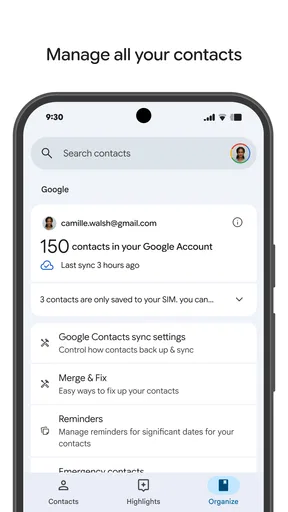
Cloud backup and access across devices can also make a phone change less stressful, provided I use the same account and have the relevant sync settings in place. I would check that contacts have finished syncing before wiping or trading in an old device; I would not treat a new phone appearing to be ready as proof that every record has transferred. For especially important numbers, keeping a separate trusted copy can be a sensible precaution. Sync is convenient, but it is not a substitute for thinking about what would happen if I lost access to an account.
Where it fits among address-book alternatives
Compared with a phone’s built-in address book, this app’s strongest reason to choose it is its close fit with Google’s contact ecosystem and the ability to keep information available beyond one handset. If I only use one phone and already like its default contacts app, switching may add little. A device-maker’s address book can feel more at home with that phone’s own interface, while a cloud-centered option is more attractive when continuity across devices matters to me.
It is also different from social networks and messaging apps. Those services can make it easy to find someone within their own communities, but they are not always a reliable, neutral place for the phone numbers and email addresses I need to call or write outside that service. I prefer an address book as the underlying directory and use communication apps for the conversations themselves. That separation keeps my contact records useful even when I change how I message someone.
I would skip this choice if I need a highly specialized relationship-management tool, shared team directory, or a carefully controlled organizational contact system. A personal address book is not automatically the right place for collaborative record-keeping. I would also hesitate if I do not want contact information associated with a cloud account; in that case, I would compare local-only options and understand what might not carry over when replacing a phone.
Small habits that prevent common contact-list problems
One practical habit is to review a record at the moment I notice a change, rather than postponing it. If a friend texts from a new number, I can update the existing person’s entry instead of creating a second record and discovering the duplication months later. When I am unsure which entry is current, I check the conversation or confirm directly before deleting anything. This is a little slower than tapping the first result, but it avoids sending a personal message to the wrong person.
I also think about what belongs in the address book before importing or adding large batches of names. A long list is not automatically a useful one. I keep people I expect to contact or identify, and I am cautious about copying work or event directories into a personal account without a clear reason. That makes search more manageable and avoids turning a private list into a dumping ground for information I will never use.
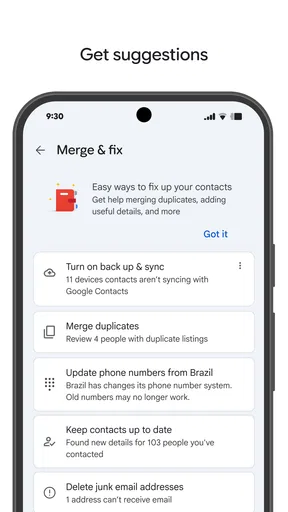
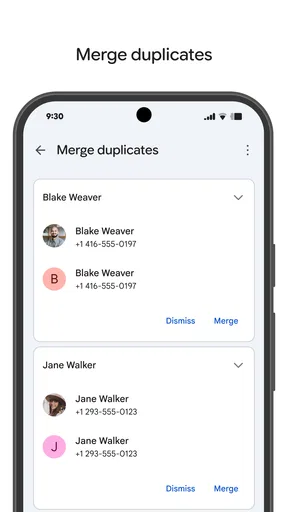
When a contact appears more than once, I take a moment to decide which details are still valid before cleaning things up. Combining entries without checking can lose a useful number or email address; leaving duplicates can make me hesitate at the wrong moment. The safest workflow is to compare the records first, preserve current details, and then remove only what I recognize as obsolete. These are ordinary housekeeping steps, but they matter more than an elaborate folder structure.
What to expect from Google’s approach
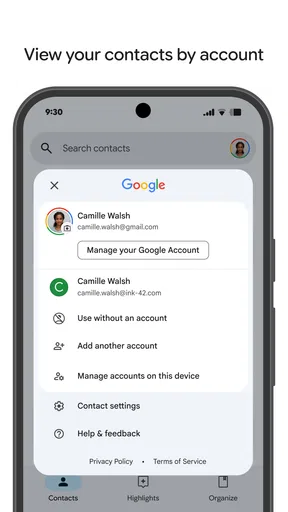
The app’s identity is closely tied to Google, which is both a convenience and a consideration. I find that appealing if I already use Google services and want contacts to follow the account I rely on. If I prefer to keep personal information separate from that ecosystem, I would weigh that choice before moving my whole address book. The question is not simply whether cloud access is useful; it is whether the account arrangement matches my comfort level and habits.
Its audience is broad: the age rating is Everyone, and the app has a 4.3 average from around 1.9 million ratings, alongside roughly 30,000 written reviews. Those figures suggest many people use it, but they do not tell me whether its account-centered approach is right for a particular person. I would focus on the everyday fit: can I find people quickly, keep details accurate, and feel comfortable with where those details are managed?
Because the app is free, trying it does not require a purchase, but moving a full contact list still deserves care. Before making it my main address book, I would check a handful of important entries on the devices I use and confirm that recent changes appear where I expect. That quick trial answers more than a general promise of convenience: it shows whether my own account setup and habits work smoothly.
A useful choice, with clear limits
I see this as a sensible option for people who want a straightforward personal directory and value access across devices. It can be particularly helpful for anyone who changes phones, keeps both personal and work contacts, or needs a reliable place to look up people outside a single messaging service. Its best quality is practical continuity, not an attempt to turn contact management into a bigger productivity system.
It is less compelling for someone whose current phonebook already works well, who wants everything stored only on the device, or who needs shared and advanced contact administration. People with visual, motor, or sensory needs should try the actual tasks they depend on with their own device settings rather than relying on a broad label of simplicity. No address book can guarantee that every interface and situation will suit everyone.
Overall, I would recommend giving it a look if a cluttered or device-bound phonebook is causing real friction. I would start with a few essential contacts, confirm how they appear on any other device I use, and build good naming habits before moving everything over. That approach keeps the benefit—finding the right person without fuss—while making the important trade-offs visible before I rely on it.
Organizing Your Contacts Like a Pro
If you’re anything like me, your contact list is probably a mix of friends, family, old colleagues, and maybe even a few numbers you’ve completely forgotten about. Contacts comes to the rescue with its intuitive organization features. You can group contacts into categories like "Work," "Family," or "Gym Buddies." It’s all about that effortless swipe and find. The app even suggests categories based on your interactions, which is pretty cool.
Integrating Social Media Profiles
One of the coolest features is how Contacts integrates social media profiles. You can link your contacts to their Facebook, Twitter, or LinkedIn profiles. No more guessing if the number you saved is still your friend's current one. Plus, it automatically updates their profile picture, so you always have a face to a name. It’s like having a mini-CRM system right in your pocket.
Smart Search and Filters
Searching for a contact has never been easier. The smart search feature lets you find contacts by name, number, or even through advanced filters like "Recently Added" or "Frequent Contacts." I love how you can customize the search to suit your needs. It feels as though the app gets smarter the more you use it.
Backup and Sync Across Devices
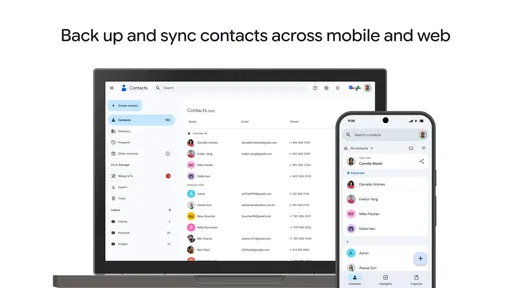
We all dread that sudden phone crash or accidental water dip, right? With Contacts, you can breathe easy. The app allows you to back up all your contacts to the cloud. Not just that, it syncs seamlessly across multiple devices. So whether you switch phones or just want to access your contacts from your tablet, it’s all there. It’s like having your contact list follow you wherever you go, without lifting a finger.
Customizable Contact Cards
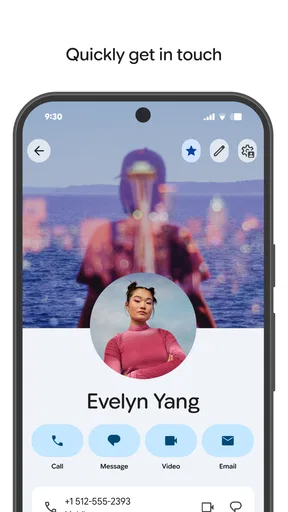
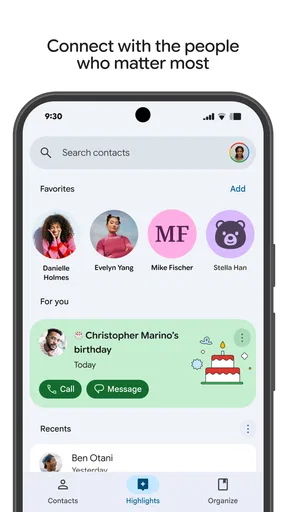
Now, let’s talk about making contacts feel a bit more personal. Contacts offers customizable contact cards where you can add notes, nicknames, or even favorite emojis. It’s a small touch, but it makes the app feel more like a personal assistant than just a digital rolodex. You can even add birthdays, and the app will remind you, so you never miss sending those birthday wishes.
User-Friendly Interface
The interface is clean and user-friendly. Everything is where you’d expect it to be, and the learning curve is almost non-existent. I appreciate how Contacts doesn’t overwhelm you with unnecessary features. It sticks to its main goal – keeping your contacts organized and accessible.
In conclusion, if you're looking for an app that takes care of your contact list without any hassle, Contacts is definitely worth checking out. It's like having your own personal assistant that keeps everything neat and tidy. So go ahead, give it a try, and say goodbye to contact chaos. Trust me, you’ll wonder how you ever managed without it!
Pros
- User-friendly interface for easy navigation.
- Seamless integration with email accounts.
- Efficient contact management with groups.
- Quick search feature saves time.
- Data backup ensures contact safety.
Cons
- Limited customization for contact fields.
- Occasional sync issues with updates.
- Requires internet for full functionality.
- Ads can be intrusive in free version.
- No dark mode option available.
FAQs for Contacts
What features does the Contacts app offer?
The Contacts app provides a comprehensive solution for managing your personal and professional contacts. It offers features like contact grouping, easy search and filter options, integration with email and social media, and backup capabilities. It also supports contact syncing across devices, ensuring you have access to your updated contact list anytime, anywhere.
Is the Contacts app secure?
Yes, the Contacts app prioritizes user privacy and data security. It uses encryption to protect your contact information and offers options for secure backups. Additionally, it complies with international data protection regulations, ensuring that your personal data is handled responsibly and securely.
Can I import contacts from other platforms?
Absolutely! The Contacts app allows you to import contacts from various platforms like Google, iCloud, and Outlook. It supports multiple file formats such as vCard and CSV, making the migration of your existing contact list seamless and hassle-free.
Does the Contacts app support contact sharing?
Yes, sharing contacts is simple with the Contacts app. You can easily share individual or grouped contacts via email, messaging apps, or through QR codes. This feature is particularly useful for networking and sharing information without manually entering details.
Is the Contacts app customizable?
The Contacts app offers a high degree of customization to suit your preferences. You can personalize contact details, add custom fields, and choose different themes or layouts. This flexibility allows you to organize your contacts in a way that best fits your personal or professional needs.


